![RaceID-Wordmark.png]](https://support.raceid.com/hs-fs/hubfs/RaceID-Wordmark.png?height=20&name=RaceID-Wordmark.png)
You changed something in Pace Admin, but you can't see it on your race page. Go through the checks below – it is usually one of these.
Start with Race preview
1. Open your race in Pace Admin.
2. Click Race preview (1) to see your race page.

The whole race doesn't show
1. Check that Publish Event (2) is on. When it is off, participants can't see your race.
2. Check that your race is approved. A new race must be approved by us before it goes live.
3. Can't find your race when you search on the website? Turn on Searchable Event (4).
Read more: Send my event for approval
A distance doesn't show
1. Open your race. Click the three dots next to the distance and select Edit.
2. Click Distance details and check that Show Distance (2) is on.
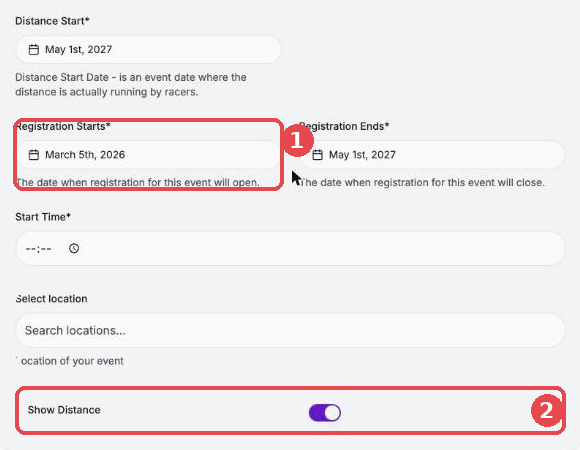
Read more: How to hide/show a distance online
Registration is not open
1. Check that Open Registration (3) is on.
2. Check Registration Starts (1) in Distance details for each distance. Registration opens on that date, even if you turned on Open Registration earlier.
Read more: How to open your registration
My change shows in one language only
Each language has its own text. When you change the text in your default language, you must also update it in each translation.
1. Click Edit race and then Manage translations.
2. Choose the language (1). A red mark (2) shows a field that is missing or not translated.
3. Update the text and do the same for each language.
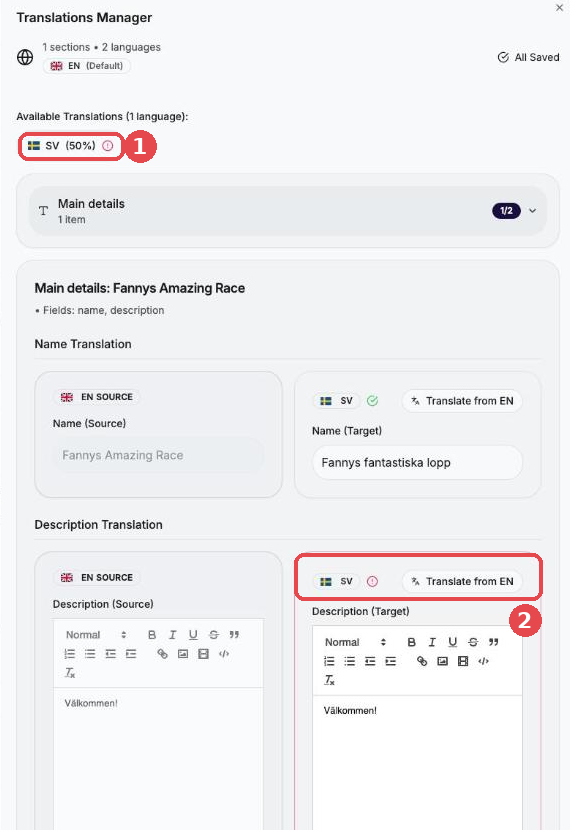
Distances have their own translations. Open the distance and click Manage translations there too.
Images in the description: If you added an image in the description, add it in each language's description as well.
Read more: Translations and How can I add a picture to my event page?
Still not showing?
Email organizer@raceid.com with your race name, what you changed and the language you are looking at. We are happy to help!