![RaceID-Wordmark.png]](https://support.raceid.com/hs-fs/hubfs/RaceID-Wordmark.png?height=20&name=RaceID-Wordmark.png)
Check these five things
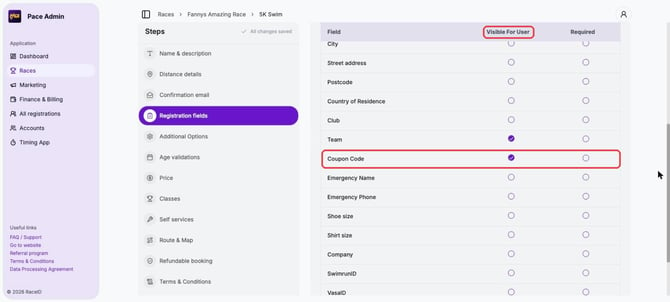
1. The Coupon Code field is shown in the registration form. Open the distance, click More and choose Edit distance. Under Registration fields, make sure Coupon Code is ticked in the Visible For User column. Check this for each distance.
2. The coupon is active and valid today. Go to Marketing → Coupons and open the coupon. Check that it shows Active and that today is within the Valid Period.
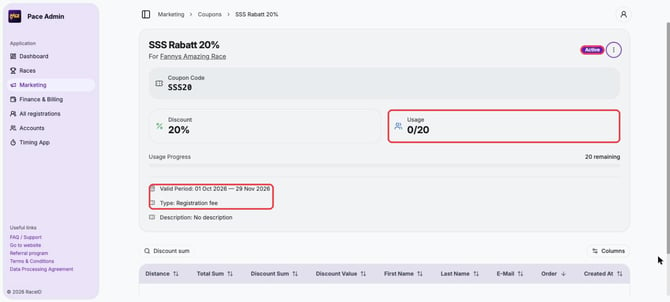
3. The coupon has uses left. Usage on the coupon page shows how many times it has been used out of the total. When all uses are taken, the code no longer works.
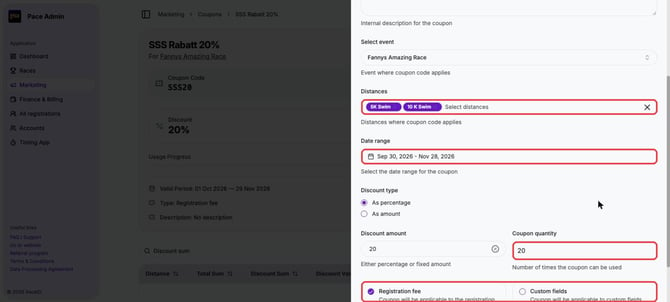
4. The coupon is set up for the right race, distance and fee. On the coupon page, click ⋮ → Edit. Check Select event, Distances, Date range and Coupon quantity, and whether the coupon applies to the Registration fee and/or Custom fields.
5. The participant enters the code exactly as it was created.
Tips
- In Marketing → Coupons the list shows Quantity, Left, Race and Distance for each coupon, so you can check several at once.
- How to create and edit coupons: Create, edit and manage Coupon Codes.