![RaceID-Wordmark.png]](https://support.raceid.com/hs-fs/hubfs/RaceID-Wordmark.png?height=20&name=RaceID-Wordmark.png)
Where to find coupon codes
1. In the left menu, click Marketing. This opens the Marketing Hub.
2. Click Coupons. You now see an overview of all your coupon codes.
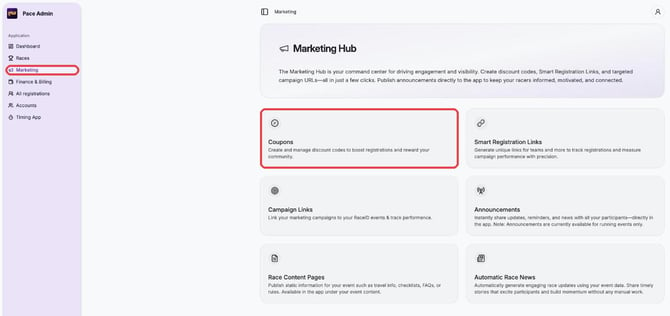
Overview of coupon codes
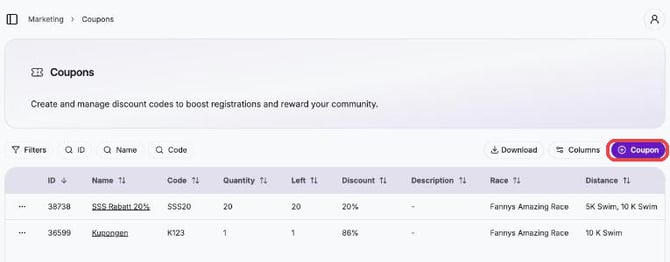
In the coupon overview you can manage all your codes in one place:
- See details such as name, code, quantity, how many are left, discount, race and distance
- Use the filters to quickly find a specific coupon code (by ID, name or code)
- Download your coupon codes with the Download button
Create a coupon code
1. Click the purple Coupon button in the top right.
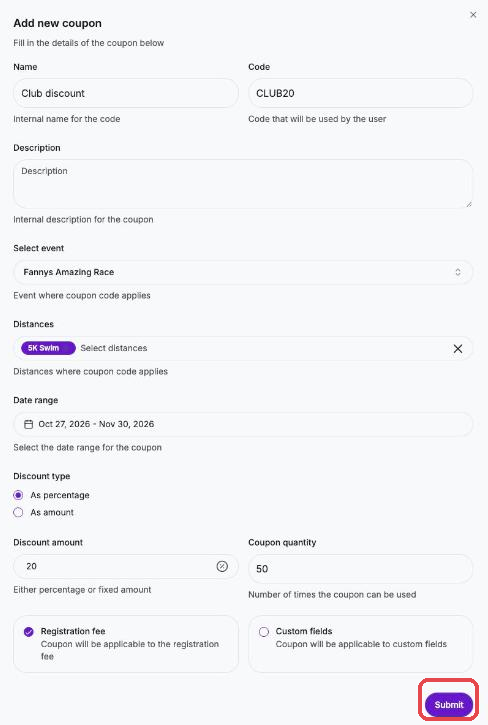
2. Fill in the form that opens:
- Name: an internal name for your own reference
- Code: the code participants enter when they register
- Description (optional): an internal description
- Select event: the race the coupon applies to
- Distances: one or more distances where the coupon is valid
- Date range: click the start date and then the end date in the calendar
- Discount type: As percentage (e.g. 20% off) or As amount (a fixed amount off)
- Discount amount: the percentage (e.g. 50 for 50%) or the amount to deduct
- Coupon quantity: how many times the coupon can be used
- What the discount applies to: Registration fee, Custom fields (e.g. T-shirts and extras in your form), or both
3. Click Submit.
Your new coupon code now shows in the list, where you can follow its usage and manage it at any time.