![RaceID-Wordmark.png]](https://support.raceid.com/hs-fs/hubfs/RaceID-Wordmark.png?height=20&name=RaceID-Wordmark.png)
There are two ways to update your participant in the start list. One is through the participant info card and one is by simply double clicking the info you want to change. Depending on the info you will either be able to change it directly in the overview or you will need to change it in the participants info card.
-
Go to Races in the main menu, and click on the race you want to edit.
-
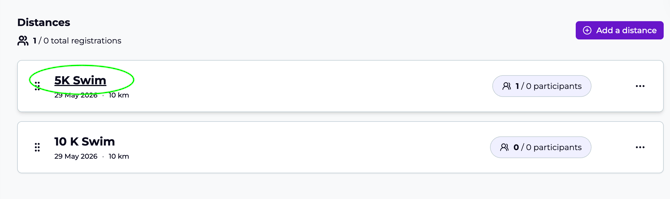
Scroll down until you get to the list of your distances, and click on the Title of the Distance you want to edit a participant in:
-
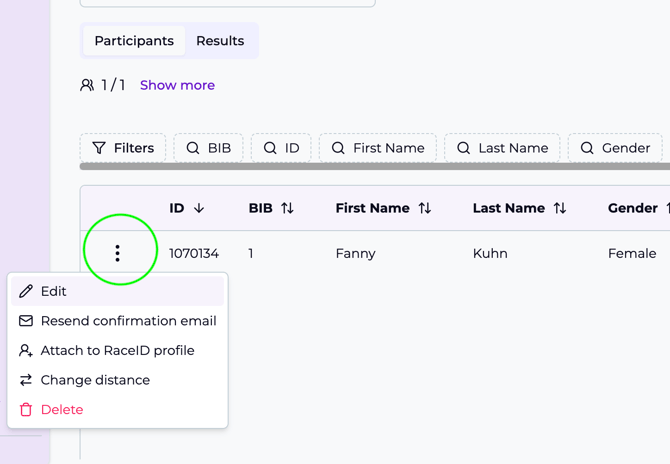
To change a participant in via the participant info card you simply search for or find the participant you want to edit in the list, and click on the 3 dots next to the person's name and select "Edit" from the menu that pops out:
-
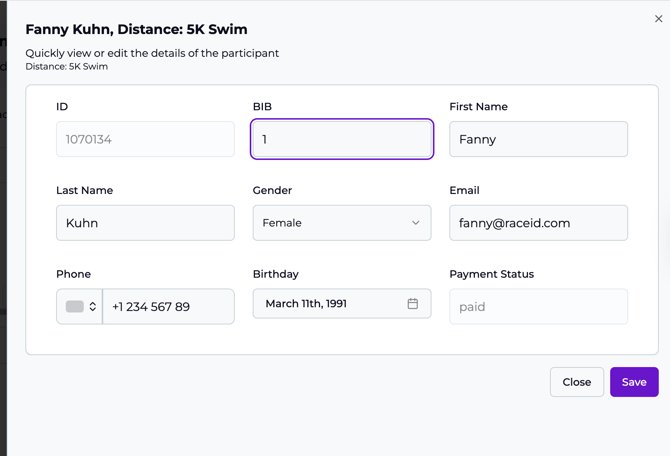
A pop-out section will appear, and you can edit any data you want. Make your changes, and click the purple save button below when you are done:
- There is also the quick change that you can access by simply double clicking on the participant info in the start list. You will see a small info text showcasing if you can change it directly in the overview or if the double click will open up the participant info card.