![RaceID-Wordmark.png]](https://support.raceid.com/hs-fs/hubfs/RaceID-Wordmark.png?height=20&name=RaceID-Wordmark.png)
If your event offers more than one distance, you as a race organizer will most probably get the question from one och several of your registered participant: "Can I change distance?". Here is a guide on how you can move participants between distances in Pace Admin in the start list of.
-
Go to the event you want to move participants between distances in
-
Choose the distance that the participant is registered to
-
Find the participant that you want to move
-
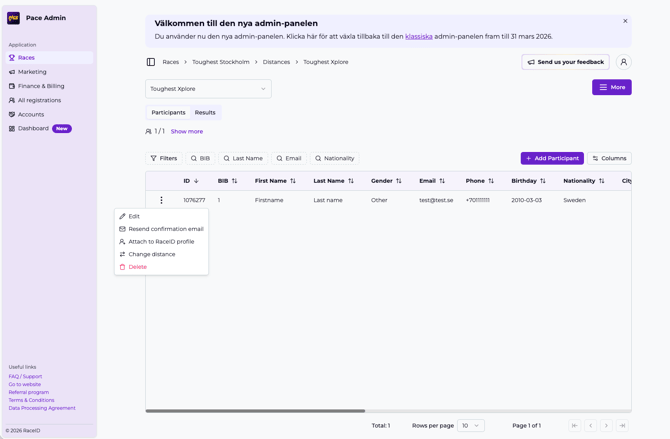
Open Actions menu:
-
Click the three dots next to the participants
- Select "Move Participant"
-
-
Select new distance (A modal will open where you can):
-
Move the participant by choosing the distance within the same event that you want to move the participant to.
NOTE! If you have custom field information that shall be moved with the participant from the old distance to the new distance it is important that you add this information for each custom field in the Admin start list after you have added the participant to the new distance. - Click on Move participant to action the switch
-
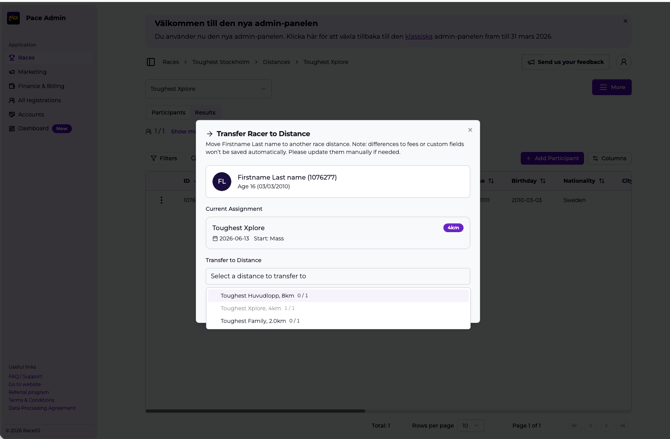
- Done, the participant is moved to the new distance and deleted from the old one.